Modern companies require modern customer relationship management. Salesforce meets the needs of various enterprises. Salesforce may help you raise and speed sales, build customer loyalty, and improve marketing capabilities. It enables teams throughout a company to access and use the most recent client information in order to streamline business processes and offer the most effective services and solutions. However, in order for this to happen, firms must create a Salesforce integration plan to ensure that it integrates with the essential enterprise systems.
There are numerous touchpoints and opportunities for Salesforce integrations to provide value for an enterprise, such as dealing with legacy systems, incorporating systems from M & As, developing a partner ecosystem, or building new company initiatives. All of these needs will lead to uncovering new opportunities, new ways to approach an account, or new value-adds to your customers, and all will need to be integrated into Salesforce.
When considering the variety of Salesforce integration needs, common patterns emerge for how to address them. Patterns, as denoted here, are the most logical sequence of steps to solve a specific type of Salesforce integration problem, and are established from actual use cases.
First, we need to define an integration application; it includes both a business use case and a pattern. The business use case consists of the value obtained from a particular integration and the patterns the generic process for data movement and handling.
The following structure can be used to delineate the format of a simple point-to-point atomic integration:
Application(s) A to Application(s) B – Object(s) – Pattern
In order to templatize common integration needs or best practices, patterns must first be established to make integrations reusable, extensible, and understandable. A pattern must contain a combination of at least two of the below elements:
The source system where data resides prior to execution.
The criteria that determine the scope of data to be copied, moved or replicated.
The transformation which the data set will undergo.
The destination system where the data will be inserted.
The results capture to compare the original state with the desired state.
The five most common Salesforce integration patterns are:
Migration
Broadcast
Aggregation
Bi-directional synchronization
Correlation
1. The Migration Pattern

Data migration is moving a specific set of data at a particular point in time from one system to another. A migration pattern allows developers to build automated migration services that create functionality to be shared across numerous teams in an organization. Developers can set the configuration parameters to pass into the API calls, so that the migration can dynamically migrate scoped Salesforce data in or out of Salesforce either on command or on an as-needed basis via an API. One way to save a great deal of time for development and operations teams is to create reusable services for frequent data migrations.
Migrations are appropriate for numerous Salesforce integration use cases, including migrating data from a legacy system to Salesforce, backing up a customer master dataset, consolidating CRM systems, etc. They are intended to handle large volumes of data, process many records in batches, and have a graceful failure case. Migrations are essential to any data systems and are used extensively in any organization that has data operations — in other words, every organization. In addition, migration is important for keeping enterprise data agnostic from the tools used to create it, view it, and manage it, so it can be used and reused by multiple systems. Without migration, data would be lost any time tools were changed, deeply affecting productivity.
2. The Broadcast Pattern
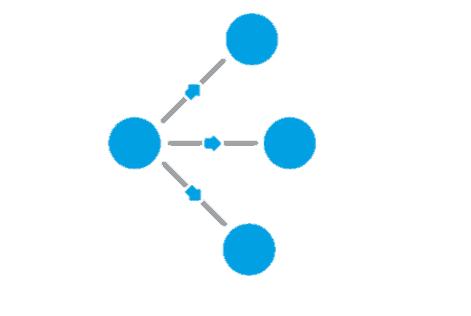
The broadcast Salesforce integration pattern moves data from a single source system to multiple destination systems in an ongoing, near real-time, or real-time basis¬. Essentially, it is one-way synchronization from one to many. Typically “one way sync” implies a 1:1 relationship; the broadcast pattern creates a 1:many relationship.
In contrast to the migration pattern, the broadcast pattern is transactional and is optimized for processing records as quickly as possible. Broadcast patterns keep data up-to-date between multiple systems across time. It’s important that a broadcast Salesforce integration pattern be highly reliable to avoid losing critical data in transit. And because these integration patterns generally have low human oversight as they are usually initiated in mission-critical systems by a push notification or are scheduled, reliability becomes even more crucial.
The broadcast pattern allows for the immediate transfer of customer data between systems, As an example, the pattern can enable an action in Salesforce to immediately translate into order fulfillment processing. Some common use cases for the broadcast pattern include: creating a sales order in SAP when an opportunity is marked as CLOSED WON in Salesforce, or synchronizing real-time data from Siebel to Salesforce.
3. The Aggregation Pattern

The aggregation Salesforce integration pattern takes or receives data from multiple systems and copies or moves it into just one system. Aggregation removes the need to run multiple migrations on a regular basis, removing concerns about data accuracy and synchronization. It is the simplest way to extract and process data from multiple systems into a single application or report.
By using an Salesforce integration template built on an aggregation pattern, it’s possible to query multiple systems on demand and merge data sets to create or store reports in .csv or other formats of choice, for example. Aggregation contains a custom logic that can be modified to merge and format data as needed and which can be easily extended to insert data into multiple systems, such as Salesforce, SAP and Siebel.
Some uses for the aggregation pattern include: Updating Salesforce with data from both ERP and issue tracking systems, creating a dashboard that pulls data from multiple Salesforce instances, while ensuring data consistency, or building APIs that collect and return data from multiple systems, or that report across multiple systems.
The aggregation Salesforce pattern enables the extraction and processing of data from multiple systems and merging them into one application; this ensures that data is always up to date, does not get replicated, and can be processed or merged to produce any desired dataset or report. This avoids the necessity of having a separate database for merged content and makes reports available in any format or within any repository. The creation of orchestration APIs that retrieve data from multiple systems and process it into one response to modernize legacy systems and the creation of a central data repository that is used for compliance or auditing purpose are some real-world scenarios in which the aggregation Salesforce integration pattern is particularly useful.
Some key considerations for using aggregation include collecting data, the scope of the source data and insert data, merging multiple datasets, formatting data, and any additional destinations. For example, when collecting data, there are two ways to do so: either create a system that listens for messages from multiple systems and aggregates them in real time, or create an application that is triggered by an event. When combining multiple datasets, you must consider how to merge them and how to present the data in the final report or destination system.
4. The Bi-Directional Sync Pattern

Bi-directional sync Salesforce integration patterns unite multiple datasets in multiple different systems, causing them to behave as one system while allowing them to recognize the existence of different datasets. This type of integration comes in handy when different tools or different systems, which are needed for their own specific purposes, must accomplish different functions in the same data set. Using bi-directional sync enables both systems to be used and maintains a consistent real-time view of the data across systems.
Bi-directional sync integration enables the systems to perform optimally while maintaining data integrity across both synchronized systems. It can modularly add and remove two or more systems that subspecialize inside a domain as storage. This integration patterns is advantageous when object representations of reality must be comprehensive and consistent.
Some use cases of this particular Salesforce integration pattern include: integrating Salesforce with multiple systems that contribute to operational efficiencies and a streamlined quote to cash but still serve as the system of record for all data that needs to be synchronized.
5. The Correlation Pattern

Correlation and bi-directional sync Salesforce integration patterns are very similar but there is one important difference. The correlation pattern singles out the intersection of two data sets and does a bi-directional synchronization of that scoped dataset, but only if that item occurs in both systems naturally. Bi-directional synchronization will create new records if they are found in one system and not the other. The correlation pattern does not discern the data object’s origin. It will agnostically synchronize objects as long as they are found in both systems.
This pattern is useful for cases in which two groups or systems only want to share data, but only if they both have records representing the same items or contacts in reality. For example, hospitals in the same healthcare network might want to correlate patient data for shared patients across hospitals, but want to avoid privacy violations consisting of sharing patient data with a hospital that has never admitted or treated the patient.
With the correlation pattern, the most important consideration is the definition of the term “same” across records. This definition can vary by industry; in addition, consequences for unclear definitions also are variable. For example, in the retail industry, when targeting offers to customers, the same name may be close enough to achieve the goal; however, in a healthcare setting, relying on a name alone could have serious consequences if two patients have the same name and different courses of treatment. The table below illustrates what can occur when the definition of “same” is too strict, too lax, or accurate across correlation and bi-directional sync integration patterns:

The correlation pattern allows shared account data to be synchronized across applications, including Salesforce instances, either across an organization or between a company and a partner. It can also allow for synchronization of customer data entered by two different employees in the same or different departments.
Get started: Anypoint Templates for Salesforce integration
Each integration pattern follows a consistent structure. Templates are packaged integration patterns that address the most common use cases — helping developers integrate faster to save time. MuleSoft’s Anypoint Templates for Salesforce integration are integration applications built to be configured, customized, extended, and reused. Anypoint Templates are: › Complete for atomic use cases: They are comprehensive and focused on the main base unit of value, but are compounded by adding flows in parallel or serial order. › Reusable: Anypoint Templates conform the base-to-base patterns leveraged in many variations of the same base problem. › Extensible: Anypoint Templates are designed to grow, containing limited field mappings, data scopes, insert statements, definitions of “same,” and transformations to adhere to specifics within each enterprise. › High-quality: They are built and tested with production quality in mind. › Elegant: Flows are built to read like an integration story so that they are easily understood. › Documented: Clear, complete documentation developers helps to quickly understand and initiate templates. › Easy-to-find and use: Search and browse templates for hundreds of use cases in Anypoint Exchange and import directly into Anypoint Studio, the design environment of the Anypoint Platform.
MuleSoft’s Anypoint Templates for Salesforce integration streamline and simplify the process of: › Merging data after acquiring other entities.
Moving off of a legacy CRM system.
Updating Salesforce with ERP data in real time.
Ensuring consistency of data across Salesforce instances and other enterprise applications.
Creating APIs that pull data from multiple systems.
Anypoint Platform allows for automated updates of contacts, accounts, products, leads, opportunities, and users in Salesforce when changes occur or new information appears in ERP or CRM applications, databases, or other Salesforce instances. Integration templates enhance consistency of data and records in real time across applications, geographies, business units, departments, and more.
Better Together: MuleSoft + Salesforce Over the years,
MuleSoft has invested in understanding Salesforce with blueprints, connectors, and expertise to accelerate your connectivity. Today, MuleSoft and Salesforce are better together with a wide range of offerings to power your digital transformation such as:
100+ pre-built Salesforce connectors and assets, each built with proprietary knowledge of use cases for unmatched connectivity and reliability.
First to market connectivity to new Salesforce products and API revisions as part of a unified product experience.
One place for all teams to save, share, and discover assets in Salesforce through Anypoint Exchange.
With more support and a clear product vision, MuleSoft and Salesforce will increase developer productivity and allow you to build connected experiences faster.